Vector Text Rendering Toolkit
A Rust library for rendering text using a variety of common vector fonts.
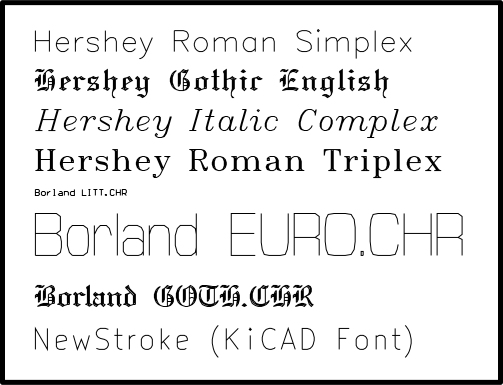
I wrote a Rust library for rendering text to a set of points using commonly available vector fonts.
#Why vector fonts?
Most font definitions in our modern world are based on filled shapes. For both printing and text rendering applications, this makes sense. At the end of the day, 99% of all text written on a computer is going to be rasterized into discrete pixels based on whether each pixel is “inside” or “outside” the shape.
However, there are still applications out there where drawing filled shapes isn’t desirable. Devices such as X/Y plotters, vector CRT displays, laser cutters, and galvo-based laser projectors can only draw strokes. In many cases, depending on the drawing APIs available, it is simply easier to work with drawing text based on a vector font.
#Hershey Fonts
One of the rather obvious things that one might want to do with a display is, of course, render text with it. For this, we need a font. Even though traditional fonts are based on vector graphics, they make use of filled shapes of varying width which can’t be replicated on a vector display.
In 1967, the U.S. Naval Weapons Laboratory published a font designed for use with vector displays named after its author Dr. Hershey. The Hershey font contained various styles for Latin, Greek, Cyrillic, and Japanese characters. The font was originally developed for display on early cathode ray tube displays which pointed the electron beam based on X and Y signals instead of forming a constant raster pattern as later CRTs did. You might recognize it as the font used by OpenCV by default.
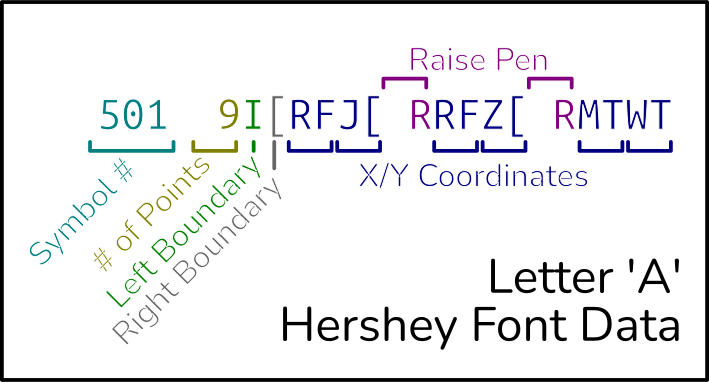
Hershey fonts are relatively easy to get up and running with, but do have a rather strange format. A hershey font file (“.jhf”) contains lines like this:
  501  9I[RFJ[ RRFZ[ RMTWT
  502 24G\KFK[ RKFTFWGXHYJYLXNWOTP RKPTPWQXRYTYWXYWZT[K[
  503 19H]ZKYIWGUFQFOGMILKKNKSLVMXOZQ[U[WZYXZV
Each line (ignoring line wrapping) defines a symbol, including the symbol number, number of points, left and right boundaries of the symbol, and finally the individual coordinates.
You can think of these coordinates as being given in a coordinate system where the center is given by , with each row below or column to the right getting the next letter, and each row above or column to the left getting the previous letter.
The line above describes symbol 501, which is made up of nine total points and extends from column to column . The symbol consists of three lines, separated by “pen up” commands.
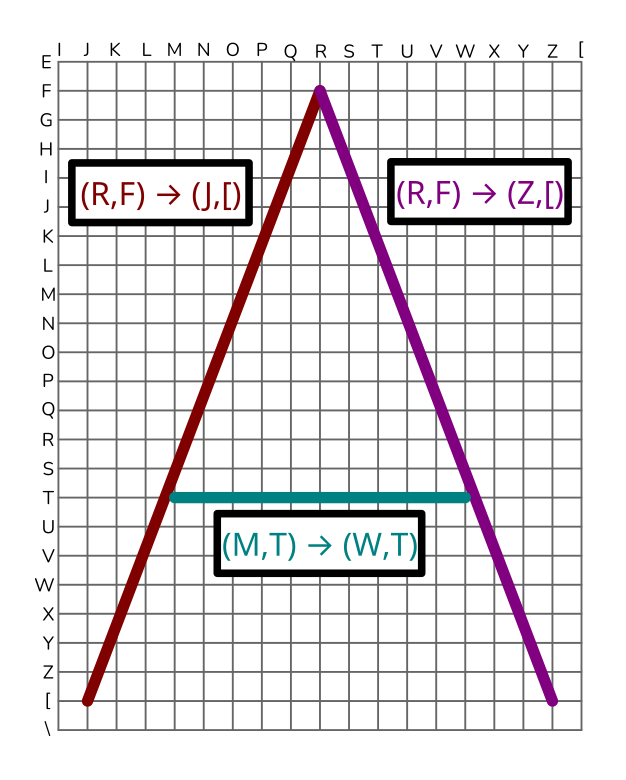
I find it easiest to envision these symbols as being plotted on a grid of letters. Usually, however, you will treat each “letter” as an ASCII offset from the letter , like this:
'I' - 'R' = -9
'[' - 'R' = 9
As you can see in this example, the lines are not placed in the best order for efficient galvo scanning. This is one of the major drawbacks of Hershey fonts.
The second piece of the puzzle is font mapping files. Hershey fonts give each symbol a numeric identifier, but this is unique to the Hershey data — a separate mapping file is required to convert it to ASCII.
#Borland Graphics Interface
A variety of vector fonts were shipped with the Borland Graphics Interface, which then made their way into GameMaker, Turbo Pascal, and other frameworks. Via those frameworks, this small set of fonts made its way into a large volume of software. One famous example is the LITT.CHR font, which became the default font in EAGLE, a popular PCB design program. This was actually how I discovered BGI fonts — through reading Astrid’s excellent post about recreating the LITT.CHR font for modern software.
Borland developed a variety of software development tools, including the aforementioned Turbo Pascal (launched in 1983) and the similarly-named Turbo C (in 1987). Both were compilers intended to run on CP/M and, later, MS-DOS. The Borland Graphics Interface was developed to provide a convenient graphics library for software written using Borland’s compilers. It was notable for supporting a wide range of graphics adapters.
While I was able to find the source files for each of the Borland fonts through the (now MIT-licensed) GameMaker source release, I struggled to find documentation for the font format. The best resource I found was this page on FileFormat.info, which seemed to be mostly accurate, but there was still plenty of trial and error in writing a parser.
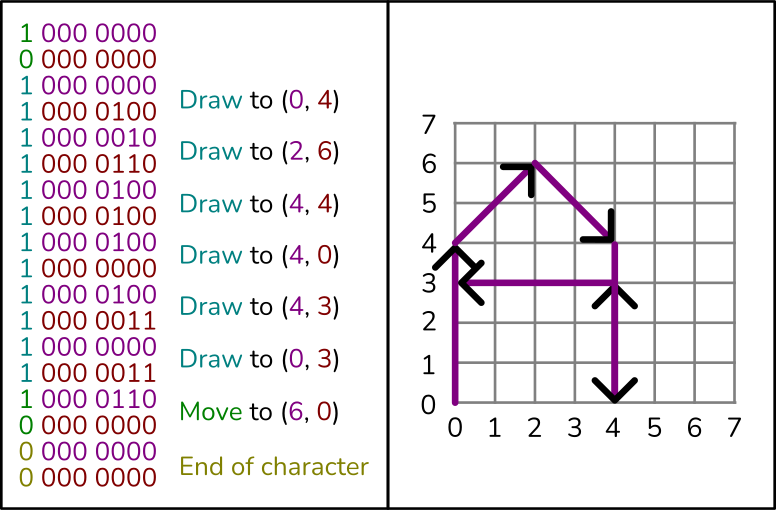
The .CHR format has some interesting quirks that definitely reflect the time period it was created in. For instance, to save space, each coordinate pair is written using only 2 bytes by encoding each value as a 7-bit twos complement integer, then using the highest bit of each value to carry additional information:
The individual character definitions consist of a variable number of words
describing the operations required to render a character. Each word
consists of an (x,y) coordinate pair and a two-bit opcode, encoded as shown
here:

Byte 1          7   6   5   4   3   2   1   0     bit #
			   op1  <seven bit signed X coord>

Byte 2          7   6   5   4   3   2   1   0     bit #
			   op2  <seven bit signed Y coord>

		  Opcodes

		op1=0  op2=0  End of character definition.
		op1=0  op2=1  Do scan
		op1=1  op2=0  Move the pointer to (x,y)
		op1=1  op2=1  Draw from current pointer to (x,y)
With a bit of bit manipulation, we can transform this format into a series of points for each glyph. A separate table in the font file stores the width of each character.
#NewStroke
One of the most recent additions to the vector font family is NewStroke, a font designed for KiCAD. Interestingly, instead of being designed in a more common type of CAD software, NewStroke actually seems to have been designed inside the KiCAD Footprint Editor. I am not sure why this was done.
Since each character is a footprint, pin definitions are used to specify metrics such as the left and right boundary of the character.
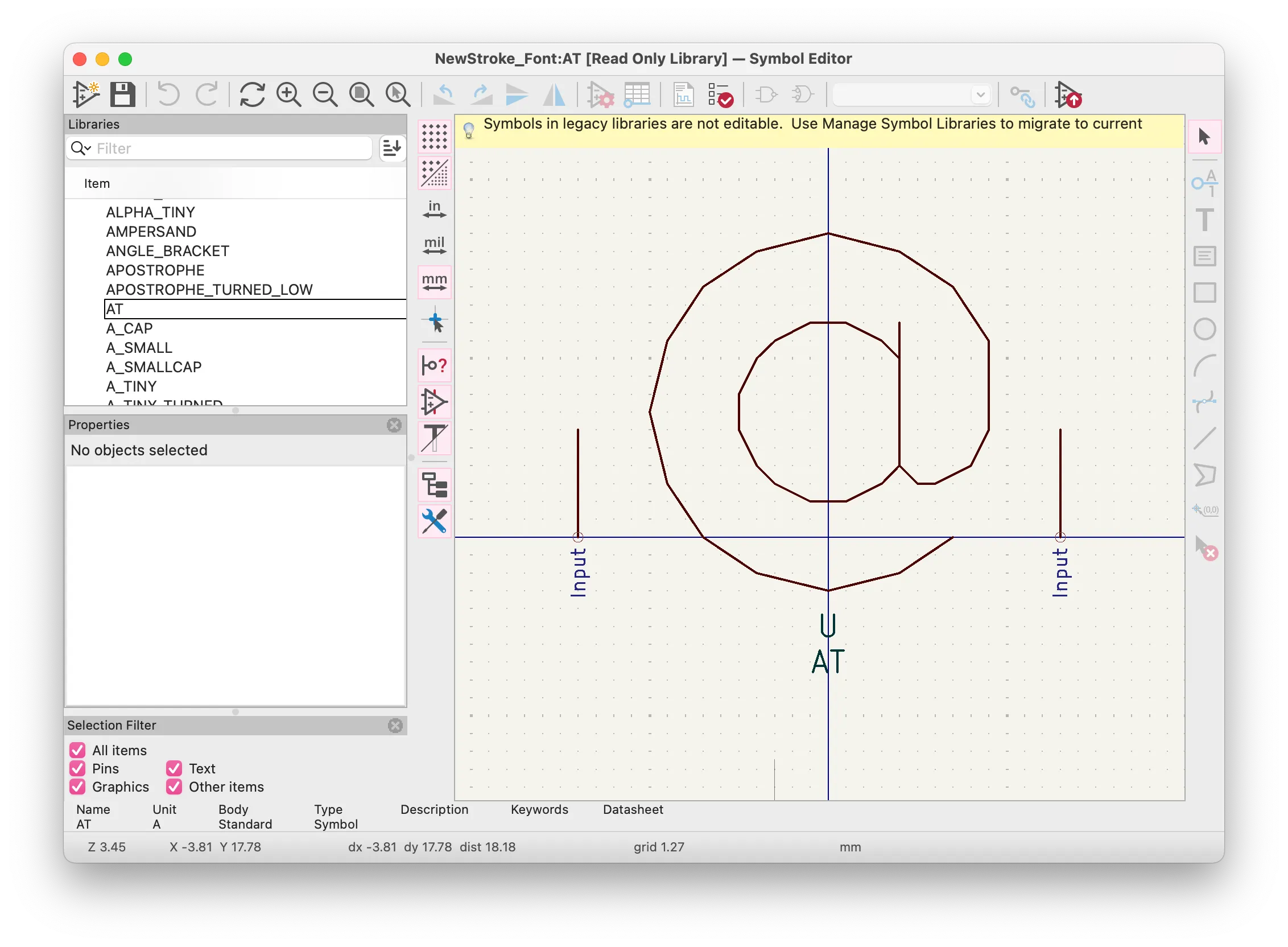
The glyphs are are defined in a .lib file (not the modern .kicad_sym format), where each glyph looks like this:
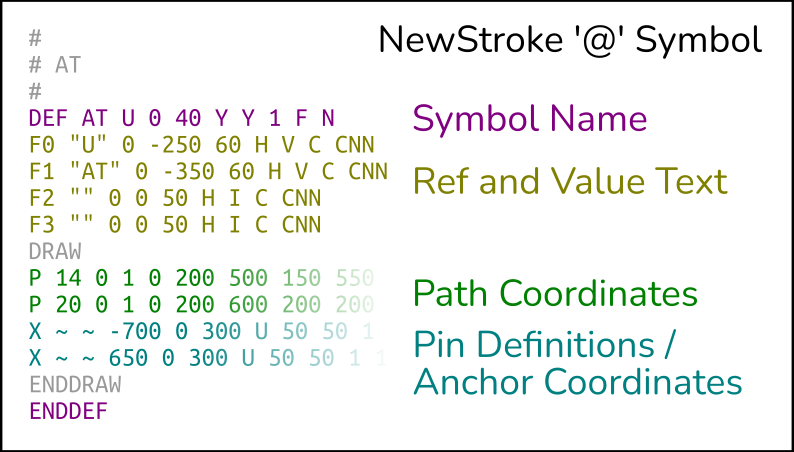
Thankfully, there are not that many directives to handle! Page 8 of the KiCAD Legacy File Format Documentation gives detail for each one. We can write a pretty simple parser for this format.
Of course, we still need something to map these symbol names to Unicode codepoints. We can do this using the charlist.txt file that is provided alongside the font library:
# symbol list

startchar 32
font newstroke_font
// BASIC LATIN (0020-007F)
+ SPACE
+ EXCLAM
+ QUOTE
+ HASH
+ S_CAP LINE_V_CAP
+ PERCENT
+ AMPERSAND
+ APOSTROPHE
+ PAREN
+ !PAREN
+ ASTERISK
+ PLUS
+ COMMA
+ MINUS
+ FULL_STOP
+ SLASH
+ DIGIT_0
+ DIGIT_1
Each line corresponds to a single Unicode codepoint. Notably, some directives are used (! to invert the parenthesis character, + to combine characters, etc) to reduce the amount of symbols required to generate the font. Fancier characters will be composed of multiple glyph parts, anchored together using additional pin definitions contained with each symbol.
The original NewStroke project used an AWK script to transpile the original font definitions into a C source code file containing Hershey-style glyph definitions. I was able to use this AWK code as a resource when writing my own parser.
#Rust Build Scripts
When writing parsers for these formats, I encountered the problem of figuring out how to efficiently store and retrieve font data from within a program. It became clear early on that the formats these fonts were originally developed in were not ideal for reading in at runtime — some made looking up a character by index excessively slow, and others made inefficient use of space.
While I thought about using macros to generate code based on the font definitions, I worried that the macro syntax would be overly restrictive. For this reason, I decided to use a build script to parse the font files at compile time and create the glyph tables.
Crates in Rust can provide a build.rs script which is invoked before the crate is compiled. In my case, I use this to generate files at runtime with font data.
#Packaging
One of the things I noticed when starting this project was that support for stroke vector font formats seemed limited in existing libraries. I decided early on that I wanted to publish these parsers as a package for others to use in their projects.
I decided to publish separate crates for each format, in order to keep all of the logic in the build scripts separate, then create a “wrapper” crate which provided each of the available fonts.
This was my first experience publishing a crate to crates.io! I would say it went quite smoothly, and the login and publishing flow took me very little time at all.
#Conclusion
The library is available on crates.io, give it a try! Feel free to open an issue if you find any issues or have ideas for improvements.
I have some plans in the works involving a vector display, and I made this project to give myself an easy way to swap out different fonts of different formats for testing. I’m quite happy with the API I was able to create!
Writing parsers like this is always an interesting challenge that I often don’t get to take on. I hope this library is useful to anyone else attempting a similar project. I definitely expect aspects of it to evolve as I begin using it more.