Playing with Wii Extension Controllers
· breq.dev

I recently spent some time writing a driver for Wii accessories (like the Nunchuck and Classic Controller). I’ve published it on crates.io as wii-accessories. Here’s a deep dive into why I chose to do this and how these controllers work under the hood!
#The search for a joystick
Recently, I was working on a project and looking for an easy way to add joystick controllers. Broadly, solutions to this problem fall under three categories.
The first category is USB-based controllers. While more microcontrollers are starting to support USB host mode, the setup required for these is still quite difficult, and the controllers themselves can be relatively expensive. These could be a good fit for projects with a full Linux system, but my project only had a microcontroller.
The second category is purpose-built controllers designed to be hooked up to microcontrollers, like the Sparkfun Quiic Joystick or Adafruit STEMMA Gamepad. These have good library support, but aren’t as ergonomic as an actual consumer controller and don’t come with an enclosure. They certainly fill a niche, but aren’t what I’m looking for.
This brings us to the third category: controllers built for older consoles. Unfortunately, most of these are hard to use in practice. The NES and SNES, for instance, used a shift-register API that’s easy for any modern microcontroller to implement, but connectors for them are hard to come by and they lack an analog stick. The PlayStation used a protocol that’s almost SPI but with a non-standard additional pin for data acknowledgement. The N64 and GameCube used a bespoke half-duplex serial protocol which is tricky to implement with standard peripherals.
All is not lost, though. As it turns out, the Wii Nunchuck manages to be almost perfect for this use case:
- Standard I2C interface. The Nunchuck connector has just 5 pins: VCC, GND, SDA, SCL, and a presence detection pin. It can even happily share a bus with other I2C devices.
- 3.3V Power. In an era where the vast majority of microcontrollers have moved to 3.3V power and logic, this eliminates the need for a separate 5V supply in many projects.
- (Sorta) easy connectors. While buying an actual expansion card connector is tricky, the Nunchuck connector can be easily emulated with an edge connector on a PCB.
- Cheap and easy to find. You might already have one around, but if not, third-party versions of the controller are easy to find and purchase online.
These benefits also apply to other controllers which use this port such as the Wii Classic Controller, giving even more options for interfacing.
#PCB Connector
Since both the connector pins and locking tabs lie in the same plane, a PCB edge connector can create a solid and reliable connection! Several breakout boards have been designed around this principle and are available for cheap online.
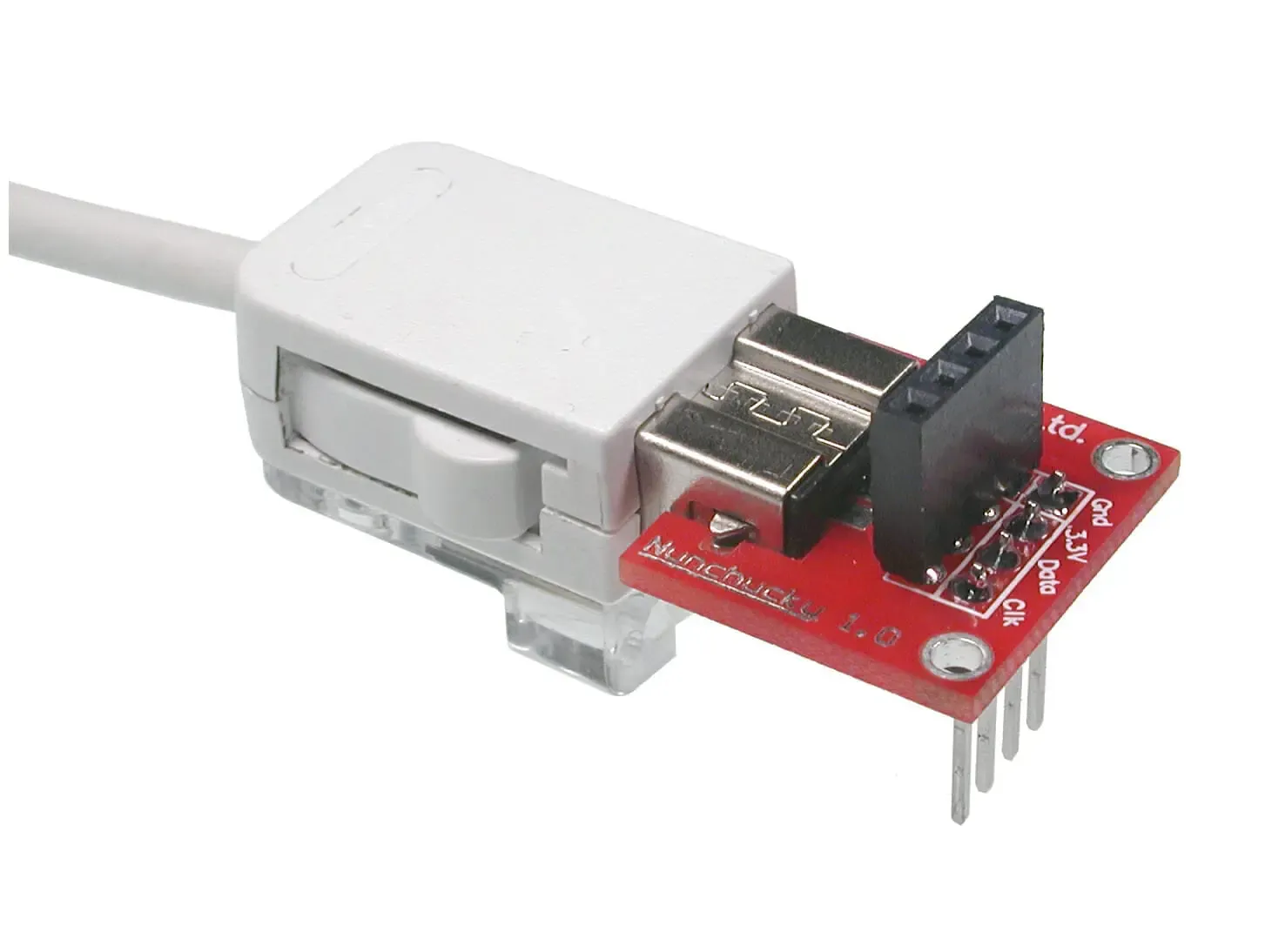
The Nunchucky, the earliest example I could find of this edge connector technique.
Building this connector into a custom board is also quite straightforward. There’s a KiCAD footprint available in this merge request that has both the pad spacing and the required board outline cuts to create the connector shape.
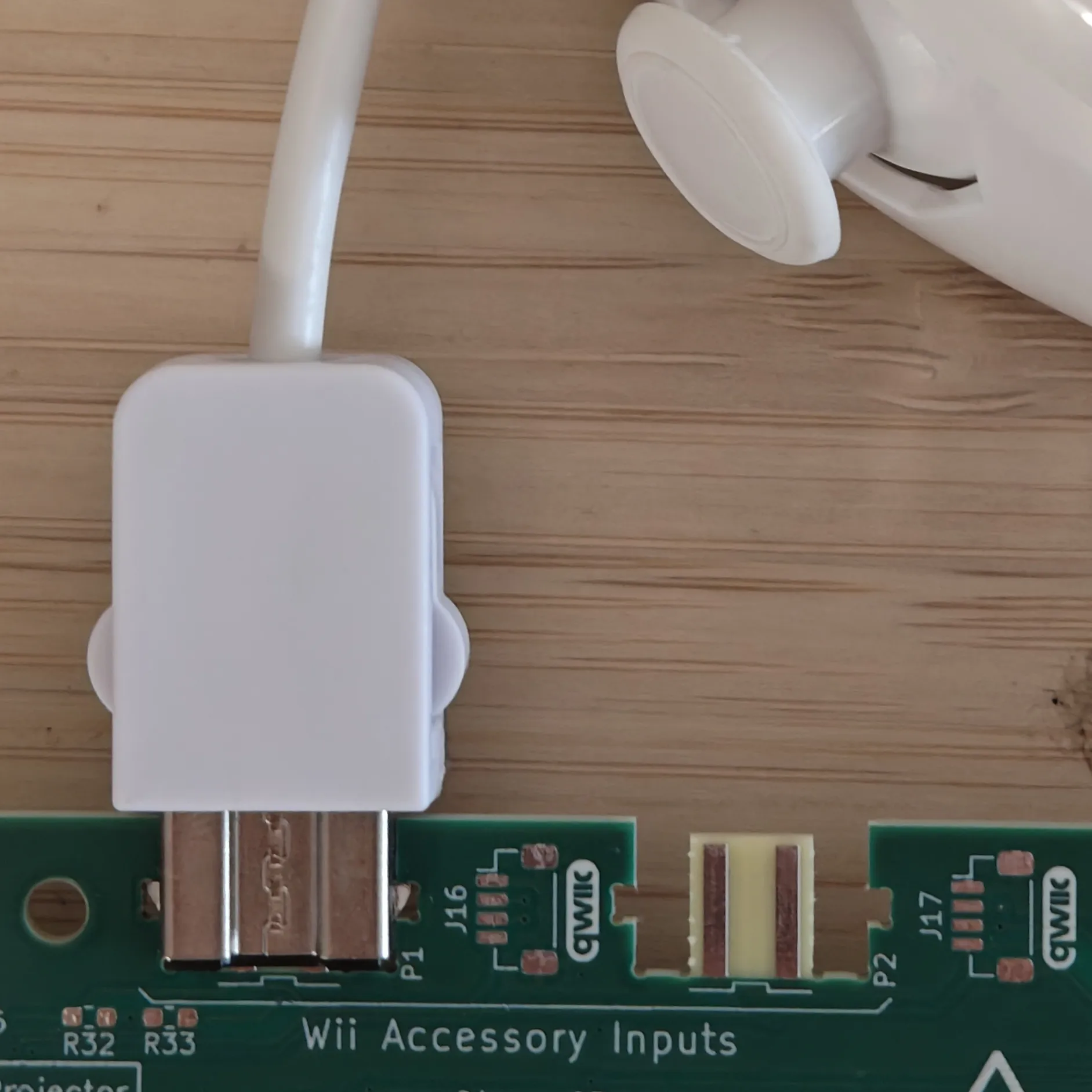
Although my girlfriend remarked that “getting a footprint from an open merge request to the KiCAD repo is like copying code from the question part on StackOverflow,” the connector seems to work great on my boards! The fit is best with a 2.0mm thick board, but I went with the standard 1.6mm thickness and found it to still work well.
#Implementing a Rust driver
While the I2C protocol is not officially documented anywhere, the Wii homebrew community has made excellent progress in reverse-engineering it. Let’s walk through some code examples in Rust to understand the protocol.
All Wii accessories use an I2C address of 0x52. You might assume that the Wii Motion Plus uses a different address from other controllers since it allows daisy-chaining, but Nintendo instead opted to invent their own complex “passthrough” modes of passing through data for reasons unknown.
const WII_ACCESSORY_ADDR: u8 = 0x52;
Nintendo decided to obfuscate data going over the I2C connection, likely to make it more difficult to reverse-engineer. With this enabled, lookup tables need to be used to de-obfuscate the data. Thankfully, this can be disabled by writing value 0x55 to register 0xF0 and then writing 0x00 to register 0xFB, regardless of the connected controller type.
i2c.write(WII_ACCESSORY_ADDR, &[0xF0, 0x55, 0xFB, 0x00])
The six bytes starting at 0xFA identify the controller model:
i2c.write(WII_ACCESSORY_ADDR, &[0xFA]).unwrap();
let mut identifier = [0x00; 6];
i2c.read(WII_ACCESSORY_ADDR, &mut identifier).unwrap();
| Identifier | Controller Model |
|---|---|
| 0000 A420 0000 | Nunchuck |
| 0000 A420 0101 | Classic Controller |
| 0100 A420 0101 | Classic Controller Pro (no analog triggers) |
| … | full table on wiibrew.org |
From here, we can start to read data! Data bytes start at 0x00 for all extension controller types. A report from the Nunchuck includes joystick data, accelerometer data, and the “C” and “Z” buttons.
| 7 | 6 | 5 | 4 | 3 | 2 | 1 | 0 | |
|---|---|---|---|---|---|---|---|---|
| 0x00 | Joystick X | |||||||
| 0x01 | Joystick Y | |||||||
| 0x02 | Accelerometer X [9:2] | |||||||
| 0x03 | Accelerometer Y [9:2] | |||||||
| 0x04 | Accelerometer Z [9:2] | |||||||
| 0x05 | Accel Z [1:0] | Accel Y [1:0] | Accel X [1:0] | C | Z | |||
Implementing this in Rust is quite straightforward, albeit tedious:
self.i2c.write(WII_ACCESSORY_ADDR, &[0x00]).unwrap();
let mut result = [0x00; 6];
self.i2c.read(WII_ACCESSORY_ADDR, &mut result).unwrap();

let x = (result[0x00] as i16 - 128) as i8;
let y = (result[0x01] as i16 - 128) as i8;

let accel_x = (result[0x02] as u16) << 2 | (result[0x05] as u16 & 0b1100) >> 2;
let accel_y = (result[0x03] as u16) << 2 | (result[0x05] as u16 & 0b110000) >> 4 as u16;
let accel_z = (result[0x04] as u16) << 2 | (result[0x05] as u16 & 0b11000000) >> 6;

let c = result[0x05] & 0b0010 == 0;
let z = result[0x05] & 0b0001 == 0;
Most of the other controller options follow quite naturally — while the data is often arranged into messages in a jumbled fashion, the community has done a good enough job with documentation that writing an implementation is straightforward.
#Go forth and have fun
In just a few lines of code, we’ve transformed an old game console accessory into a capable controller that’s easy to use in your next project. It certainly isn’t as ergonomic or featureful as a modern USB gamepad, but it’s a great option for wiring directly to a microcontroller. It ended up being perfect for an ESP32-based project I’m currently working on (which I’ll share more about in a future post!)
If you have some Wii accessories lying around and a project that could use them, maybe give my Rust crate a try! If you build something with it, I’d love to hear about it.