Infinite Coffee Glitch
· breq.dev

TL;DR
terminal.shop is an online store selling coffee beans via an SSH-based interface. They also provide an API allowing users to place orders via HTTP requests. The /order endpoint had inadequate validation, allowing for nonsensical orders including empty carts, items with quantity 0, and more interestingly: the ability to get coffee for free by adding negative quantity items to your cart. All you had to do is call this endpoint with a quantity of -1 for an item and $-22 would be deducted from your order total.
The vulnerability was responsibly disclosed and has been patched. (But even though you can no longer get coffee for free, please still check them out as they sell great products at reasonable prices!)
My girlfriends and I are big coffee enjoyers, and since getting an espresso machine in 2024, we’ve gotten deep into trying different types of coffee beans in lattes and other drinks. So when I stumbled upon terminal.shop last summer, I figured it would be a fun gimmick and a way to try out some different beans. The process is pretty simple: SSH into terminal.shop and use your keyboard to navigate the menus and order yourself some coffee.
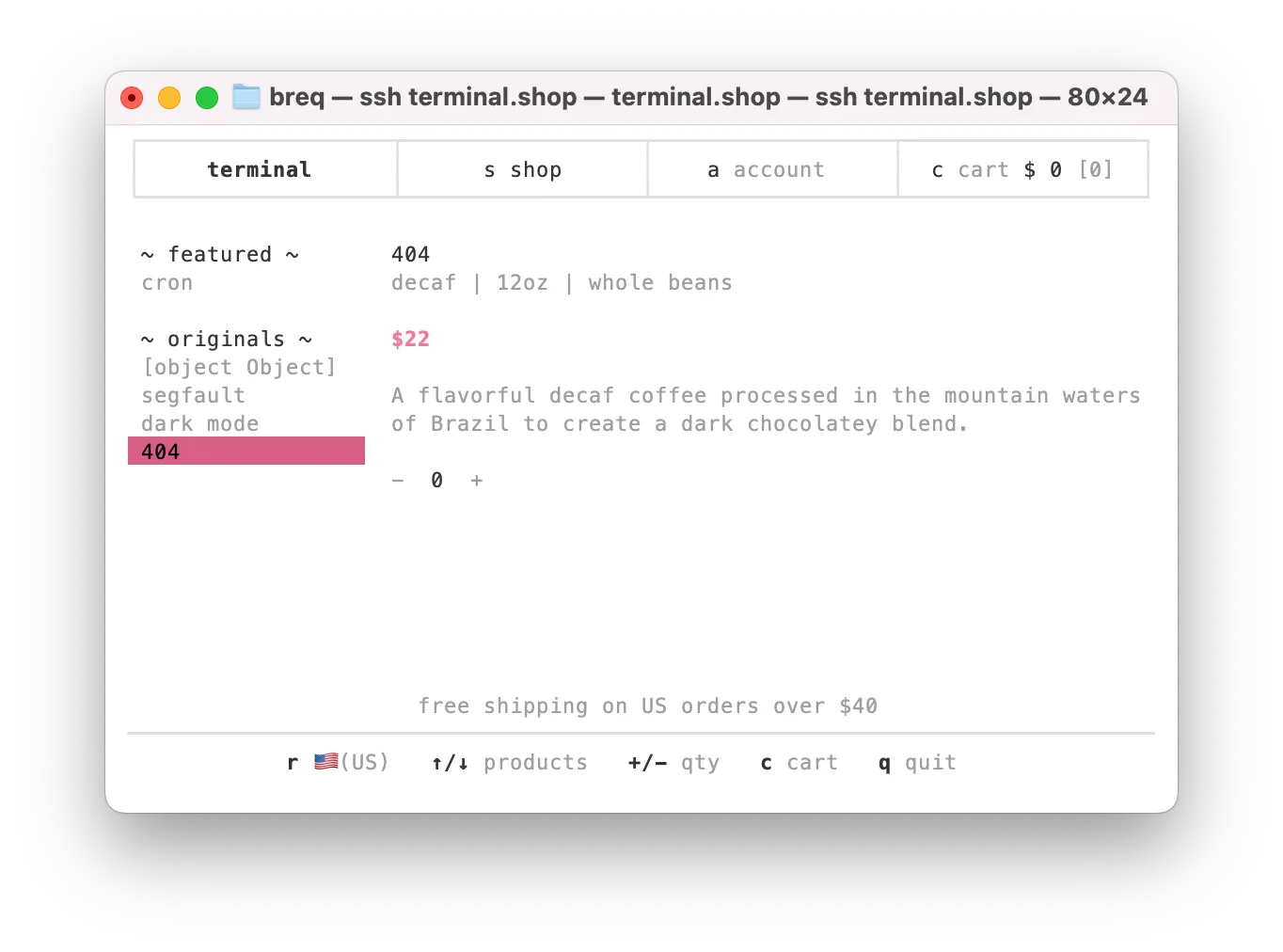
Running a storefront over SSH works really well! Pages load almost instantly (since they’re just an 80x24 grid of characters). While you don’t have the full abilities of CSS, they’ve made extensive use of ANSI codes to create an aesthetically pleasing interface. Unlike HTTPS, SSH doesn’t have public key infrastructure — there’s no certificate authority asserting that the terminal.shop server is legitimate. However, they put their SSH public key on their website so you can verify it yourself, and once you login the first time, your client will store the fingerprint to ensure the server is legitimate on future logins.
While we placed our first order because buying something over SSH sounded too fun to pass up, we ended up really liking the decaf and dark roast. However, once we become semi-regular customers, ordering via SSH lost its initial novelty, and I wanted to try something new.
#None Coffee with Left Shipping
terminal.shop provides an HTTP API that allows you to place orders. They also have a bunch of client libraries, but I found the bare HTTP documentation easier to read, so I set out to write a Bash script so I could place orders from my terminal without the hassle of a TUI. My goal was to have one command I could run any time we needed to stock up.
Unfortunately, the development backend at api.dev.terminal.shop was down when I tried to test my code, so I sighed, took out my real credit card, crossed my fingers and hit enter. I immediately got a notification that I had been charged $8 and hadn’t received a confirmation email. After a bit more digging, I realized where I had gone wrong — I had supplied the product ID of each product I wanted to buy instead of the product variant ID, causing the order to be created with an empty cart, myself to be billed $8 for shipping and $0 for my nonexistent items, and then (presumably) the backend crashing later when trying to generate my order confirmation.
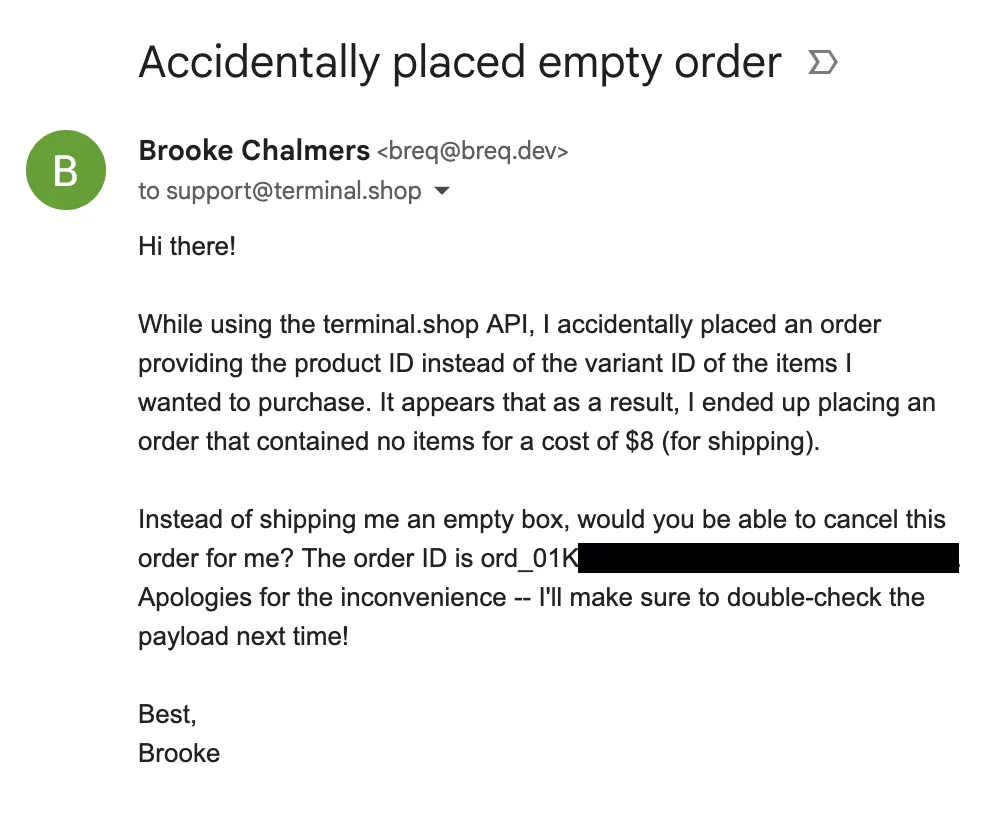
Immediately after I realized this, I sent an email to support@terminal.shop. I didn’t get a response and, for a time, resigned myself to the fact that I had paid $8 for an interesting story. (I don’t blame them for not getting back to me, Terminal Products seems to be a side project of a few content creators and I’m sure that job can be incredibly hectic.)
#Bash hacking
I patched my code and ordered again. This time, it was a success! However, something was up with the packing slip…
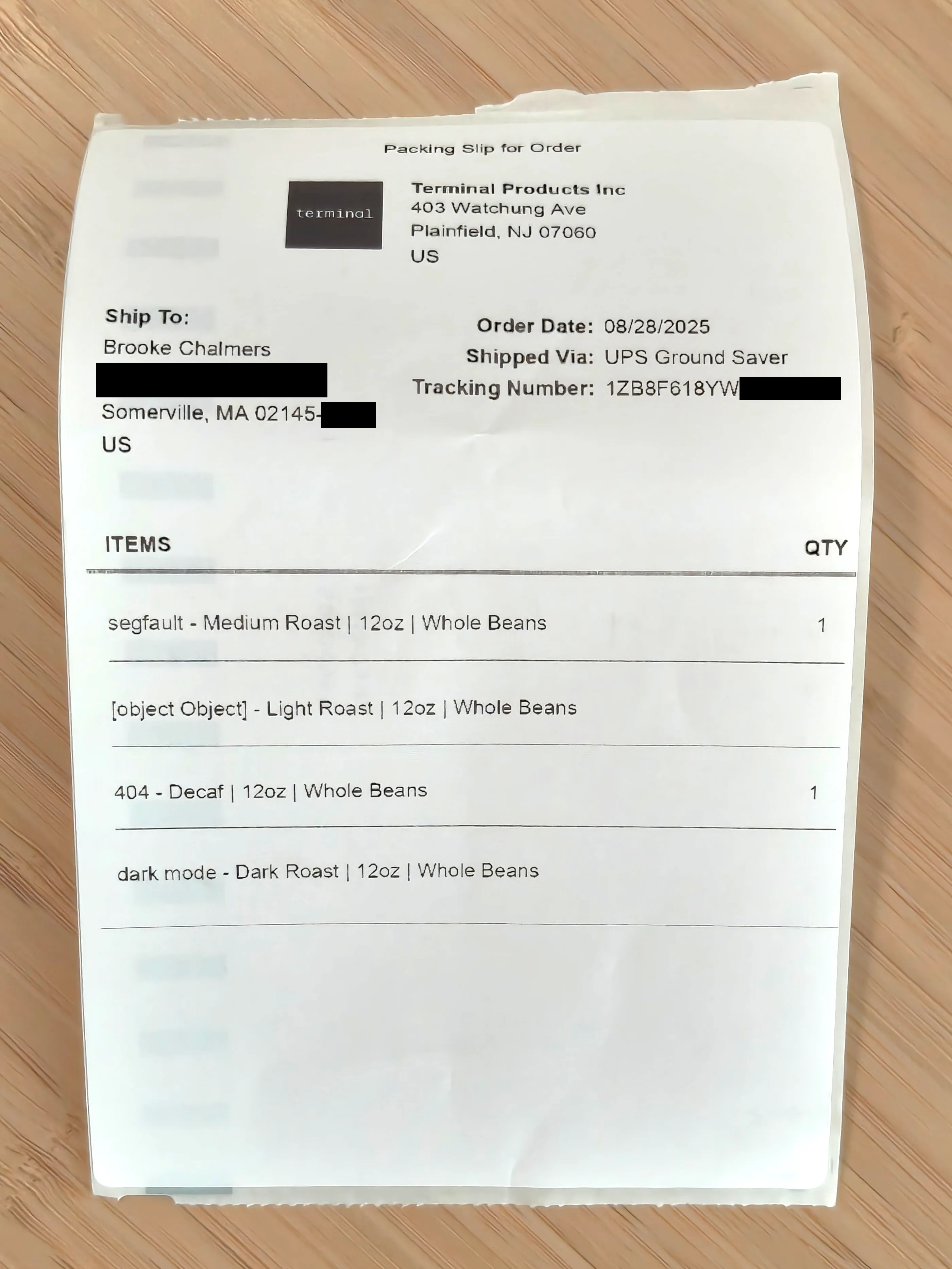
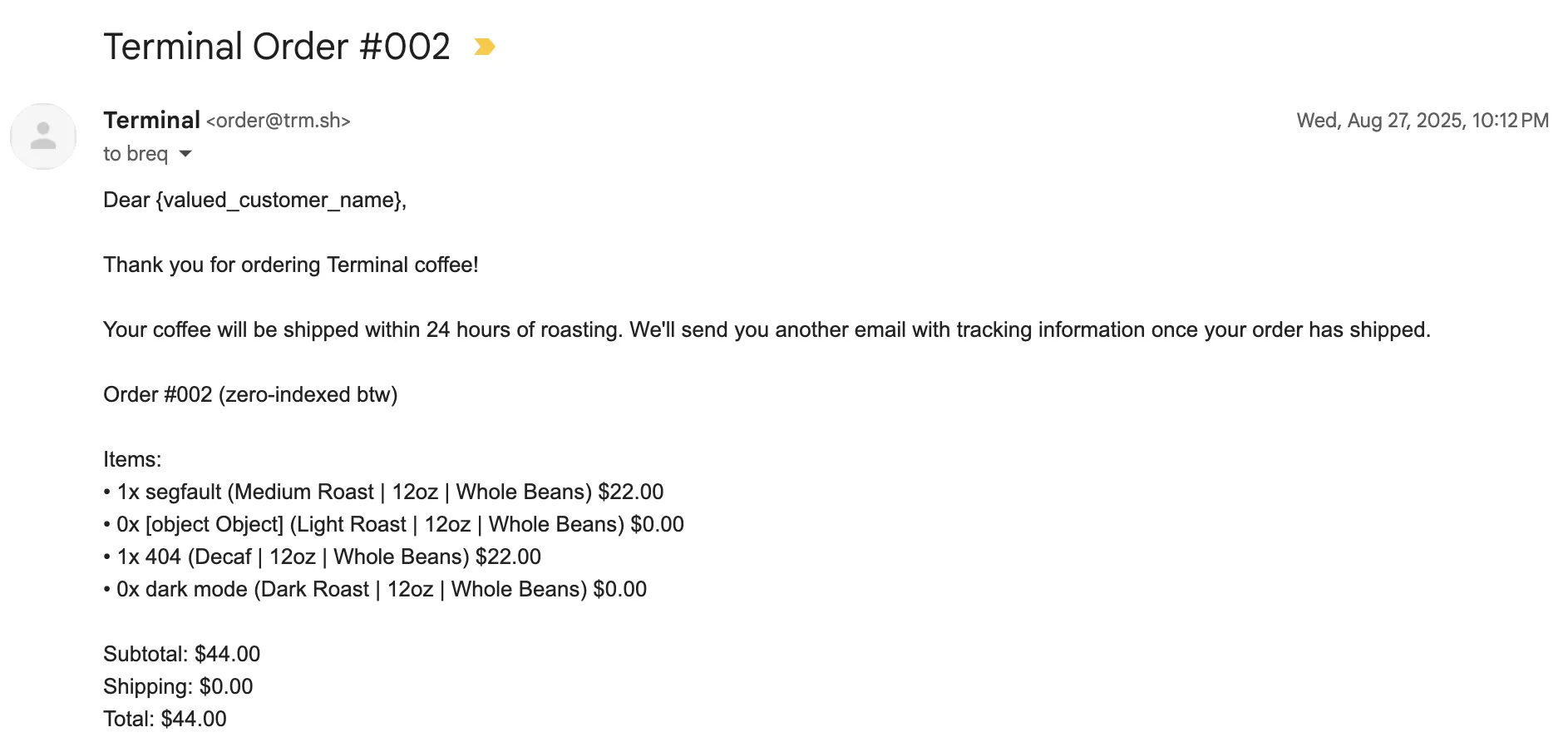
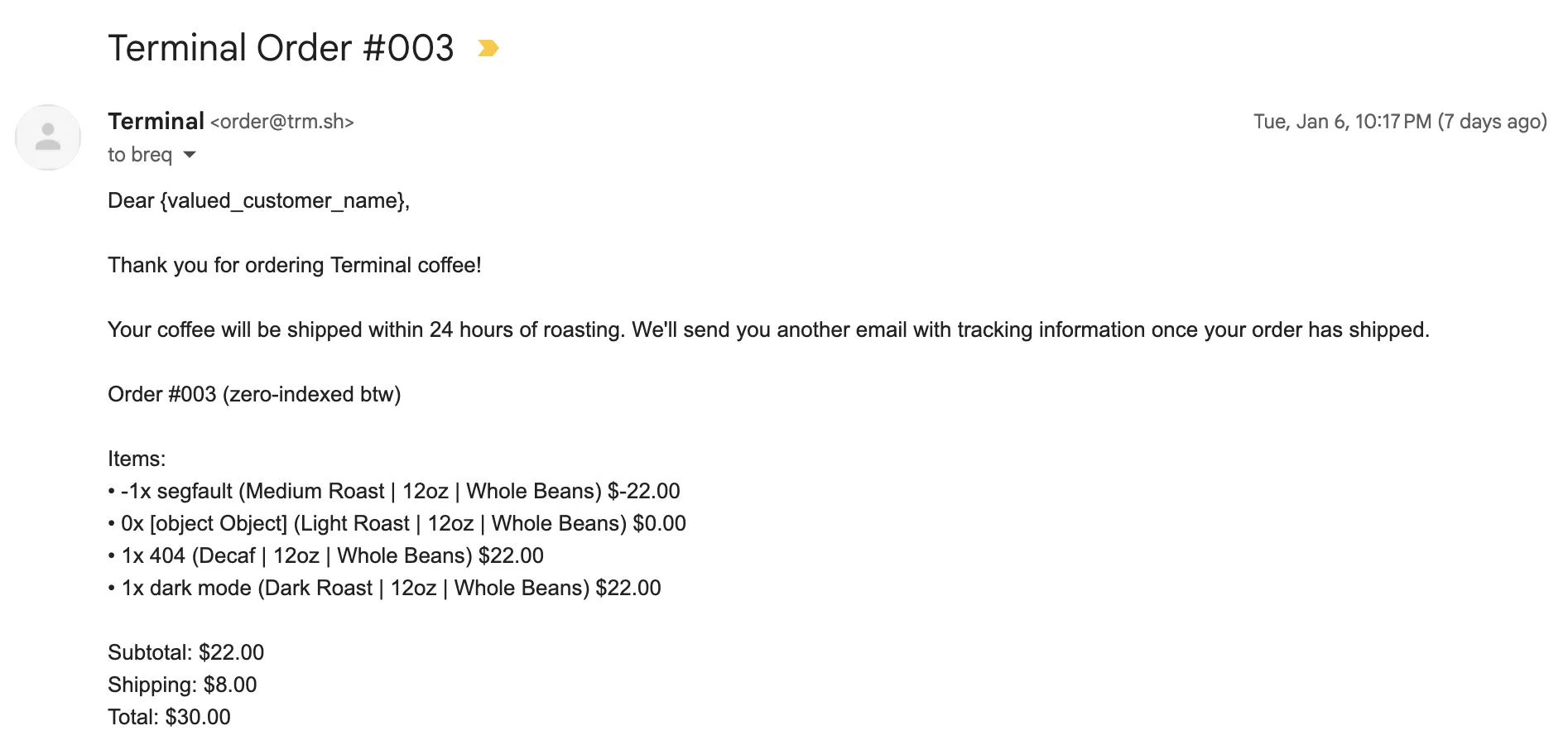
All four items in the shop were present in both the email and the packing slip, but the two I did not order had a quantity set to zero. This was a byproduct of how my ordering script worked: instead of adding each product to the payload when a user ordered it, I always put all four available variant IDs into the payload with a quantity set to zero unless that argument was set to zero.
#!/bin/bash
# usage: ./order.sh --segfault 1 --404 1

OBJECT_OBJECT_QTY=0
SEGFAULT_QTY=0
DARK_MODE_QTY=0
_404_QTY=0


while [[ $# -gt 0 ]]; do
  case "$1" in
    --object-object)
      OBJECT_OBJECT_QTY=$2; shift 2 ;;
    --segfault)
      SEGFAULT_QTY=$2; shift 2 ;;
    --dark-mode)
      DARK_MODE_QTY=$2; shift 2 ;;
    --404)
      _404_QTY=$2; shift 2 ;;
    *)
      echo "Unknown option: $1"; exit 1 ;;
  esac
done

# ...


ORDER_PAYLOAD=$(jq -n '{
    addressID: "'$SAVED_ADDRESS_ID'",
    cardID: "'$SAVED_CARD_ID'",
    variants: {
        "'$ITEM_OBJECT_OBJECT'": '$OBJECT_OBJECT_QTY',
        "'$ITEM_SEGFAULT'": '$SEGFAULT_QTY',
        "'$ITEM_DARK_MODE'": '$DARK_MODE_QTY',
        "'$ITEM_404'": '$_404_QTY',
    }
}')
This was a purely arbitrary choice I made since I thought the ergonomics of doing it this way was easier in Bash versus trying to conditionally add things to the JSON payload. I figured that the backend would just filter out any items with a quantity of zero before the order processed. But it seemed like those “quantity zero” items were still there!
#Just how much does this endpoint allow?
An idea dawned on us. It seemed like this endpoint had pretty poor validation overall. If we placed an order for the 2 types of coffee we wanted, then ordered -1 of a coffee we didn’t care about, maybe we could receive these items for less money and thus get back the $8 we lost earlier!
We were almost certain that it wouldn’t work, but I ran the script again:
./order.sh --404 1 --dark-mode 1 --segfault -1
Verified the payload it created:
{
  "addressID": "shp_XXXXXXXXXXXXXXXXXXXXXXXXXX",
  "cardID": "crd_XXXXXXXXXXXXXXXXXXXXXXXXXX",
  "variants": {
    "var_01J1JFE53306NT180RC4HGPWH8": 0,
    "var_01J1JFDMNBXB5GJCQF6C3AEBCQ": -1,
    "var_01J1JFF4D5PBGT0W2RJ7FREHRR": 1,
    "var_01J1JFEP8WXK5MKXNBTR2FJ1YC": 1
  }
}
Then sent it off, and watched the response come in:
{ "data": "ord_XXXXXXXXXXXXXXXXXXXXXXXXXX" }
We successfully created an order! Just like that, we got a notification that the card had been charged $30! Then, checking my email, I saw the order confirmation also listed payment of $30: 1 bag of 404 at $22, 1 bag of Dark Mode at $22, 0 bags of [object Object] at $0, and -1 bags of Segfault for $-22.
We waited patiently for the tracking number. Once it arrived, we checked the metadata, and the shipping label listed the package as weighing 12 oz — the weight of one bag. It would seem, somehow, our order got corrected and we were receiving only the one bag we had paid for.
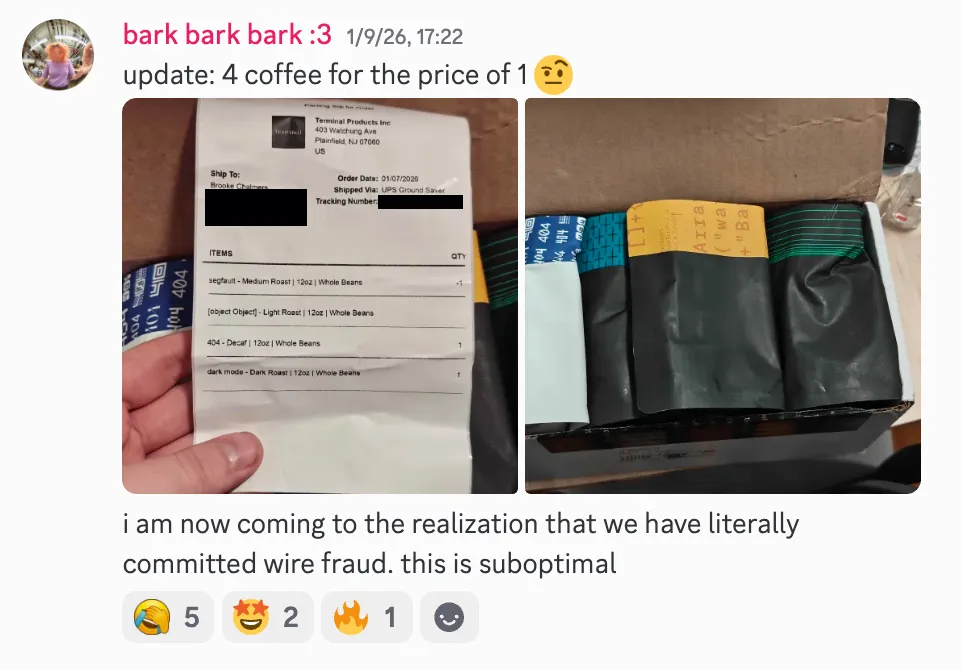
Until… a box showed up outside our apartment! I picked it up and noticed it weighed far more than a single bag. Once I opened it, I realized we had been sent all four types of coffee!
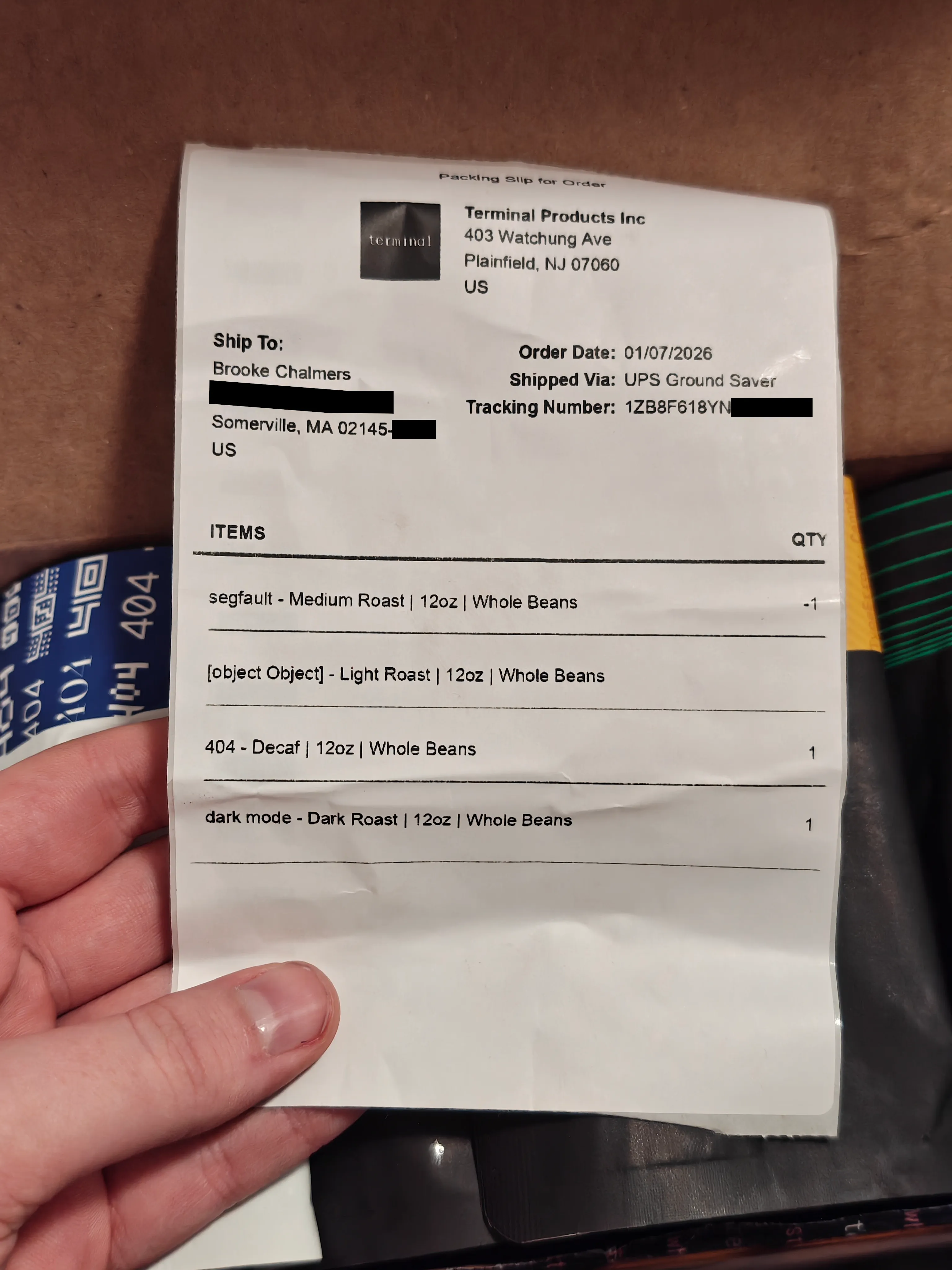
It appears the order was able to make it all the way to the human fulfilling it without being filtered out, who then probably saw the packing list, thought “oh, I guess the quantity column is messed up on this one,” and packed and shipped it off.
It quickly dawned on us what we had actually done: paid $30 for $88 worth of coffee and put Terminal Products in the position of shipping a 48 oz package with a label that said 12 oz. Not ideal!
#Aftermath
As it turns out, my girlfriend Ava realized that she unexpectedly shares a mutual acquaintance with some of the terminal.shop team, so word reached them pretty quickly.
Thankfully, the folks at Terminal were super chill about this and quickly patched the issue. Not only do I get to keep four times as much coffee as I expected, but we were given a reward for reporting this in the form of even more coffee. (Friends in Boston, please hit me up if you want a latte sometime!)
From what I can tell, everything exploitable via bare HTTP requests would be similar to accomplish with the official client libraries. The only “trick” was using the API, calling the /order endpoint directly instead of adding items through /cart/item, and just putting weird stuff in the variants field.
It was fun to watch the hypotheses come in once this was announced online: was it an obscure SSH feature? Something with SendEnv? Terminal control characters?
These explanations were all unlikely. You might think terminal.shop is built on a traditional server like OpenSSH, with the login shell set to a TUI program, which would thus leave it open to bugs or misconfigurations in a wide range of obscure SSH features. However, the answer is much nicer — the terminal.shop TUI is built with Wish, a framework by Charm that allows you to create apps accessible over SSH without ever creating an actual shell. It’s the same framework I used for fissh.breq.dev, a tiny app I made about a year ago with Ava that presents you with an ASCII drawing of a fish every day at 11:11.
Discovering this vulnerability was a long adventure in the making! I want to thank my girlfriends Ava and Mia for encouraging me and offering advice, AJ Stuyvenberg for getting us connected to the team at Terminal, and of course all the folks at Terminal Products for having an open and positive attitude towards security research. Sometimes, the most powerful bugs are the ones that require the least complicated exploits!